11.2 - נגישות מתקדמת - הרצאה
נגישות מתקדמת - Advanced Accessibility
נגישות (a11y) היא לא רק דרישה חוקית - היא חלק בלתי נפרד מפיתוח ווב איכותי. אתר נגיש מאפשר לכל המשתמשים, כולל אנשים עם מוגבלויות, להשתמש באפליקציה שלנו. בשיעור זה נלמד לעומק כיצד לבנות אפליקציות ריאקט נגישות.
הנחיות נגישות לתוכן ווב - WCAG Guidelines
WCAG (Web Content Accessibility Guidelines) הוא התקן הבינלאומי לנגישות ווב. הוא מחולק לשלוש רמות:
- רמה A - דרישות בסיסיות. ללא עמידה בהן, חלק מהמשתמשים לא יוכלו להשתמש באתר כלל
- רמה AA - הרמה המומלצת. רוב החוקים והתקנות דורשים עמידה ברמה זו
- רמה AAA - הרמה הגבוהה ביותר. לא תמיד אפשרית אך מומלצת
ארבעת העקרונות של WCAG (POUR)
- ניתן לתפיסה - Perceivable - המידע חייב להיות מוצג בצורה שכל המשתמשים יכולים לתפוס
- ניתן להפעלה - Operable - הinterface חייב להיות ניתן להפעלה בכל דרך (עכבר, מקלדת, קול)
- ניתן להבנה - Understandable - המידע והinterface חייבים להיות ברורים
- עמיד - Robust - התוכן חייב לעבוד עם טכנולוגיות מסייעות שונות
תפקידים, states וproperties של ARIA
ARIA (Accessible Rich Internet Applications) מאפשר להוסיף מידע נגישות לאלמנטים ב-HTML.
תפקידים - ARIA Roles
// Navigation role
<nav role="navigation" aria-label="ניווט ראשי">
  <ul>
    <li><a href="/">דף הבית</a></li>
    <li><a href="/about">אודות</a></li>
  </ul>
</nav>

// Alert role
<div role="alert">
  השינויים נשמרו בהצלחה
</div>

// Dialog role
<div role="dialog" aria-label="אישור מחיקה" aria-modal="true">
  <h2>האם למחוק את הפריט?</h2>
  <button>אישור</button>
  <button>ביטול</button>
</div>

// Tab role
<div role="tablist" aria-label="הגדרות">
  <button role="tab" aria-selected="true" aria-controls="panel1">
    כללי
  </button>
  <button role="tab" aria-selected="false" aria-controls="panel2">
    מתקדם
  </button>
</div>
<div role="tabpanel" id="panel1" aria-labelledby="tab1">
  תוכן הטאב הראשון
</div>
הstates וproperties - ARIA States and Properties
// aria-expanded - whether the element is expanded
<button aria-expanded={isOpen} aria-controls="menu" onClick={toggle}>
  תפריט
</button>
<ul id="menu" hidden={!isOpen}>
  <li>אפשרות 1</li>
  <li>אפשרות 2</li>
</ul>

// aria-busy - whether content is loading
<div aria-busy={isLoading} aria-live="polite">
  {isLoading ? 'טוען...' : 'התוכן נטען'}
</div>

// aria-disabled - whether the element is disabled
<button aria-disabled={!isValid} onClick={isValid ? handleSubmit : undefined}>
  שלח
</button>

// aria-current - indicates the current item
<nav>
  <a href="/" aria-current={pathname === '/' ? 'page' : undefined}>דף הבית</a>
  <a href="/about" aria-current={pathname === '/about' ? 'page' : undefined}>אודות</a>
</nav>

// aria-describedby - links an element to additional description
<input
  type="password"
  aria-describedby="password-requirements"
/>
<p id="password-requirements">
  הסיסמה חייבת להכיל לפחות 8 תווים
</p>
הכלל הראשון של ARIA
אם אפשר להשתמש באלמנט HTML סמנטי - השתמשו בו במקום ARIA.
// Not recommended - using ARIA when there's a semantic element
<div role="button" tabIndex={0} onClick={handleClick}>
  לחץ כאן
</div>

// Recommended - using a semantic element
<button onClick={handleClick}>
  לחץ כאן
</button>

// Not recommended
<div role="navigation">...</div>

// Recommended
<nav>...</nav>
ניהול פוקוס וניווט מקלדת - Focus Management
סדר פוקוס - Tab Order
// Default tab order - by DOM order
<button>ראשון</button>
<button>שני</button>
<button>שלישי</button>

// tabIndex={0} - adds the element to the natural tab order
<div tabIndex={0} role="button" onClick={handleClick}>
  אלמנט שניתן לפוקוס
</div>

// tabIndex={-1} - focusable programmatically but not via tab
<div tabIndex={-1} ref={errorRef}>
  הודעת שגיאה
</div>

// Never use a positive tabIndex!
// tabIndex={1} - breaks the natural order
ניהול פוקוס בריאקט
import { useRef, useEffect } from 'react';

// Moving focus to a specific element
function ErrorMessage({ message }: { message: string | null }) {
  const errorRef = useRef<HTMLDivElement>(null);

  useEffect(() => {
    if (message) {
      errorRef.current?.focus();
    }
  }, [message]);

  if (!message) return null;

  return (
    <div ref={errorRef} tabIndex={-1} role="alert">
      {message}
    </div>
  );
}
// Focus management in navigation (Next.js)
'use client';

import { usePathname } from 'next/navigation';
import { useEffect, useRef } from 'react';

function FocusManager({ children }: { children: React.ReactNode }) {
  const pathname = usePathname();
  const mainRef = useRef<HTMLMainElement>(null);

  useEffect(() => {
    // Moving focus to the start of content on every navigation
    mainRef.current?.focus();
  }, [pathname]);

  return (
    <main ref={mainRef} tabIndex={-1}>
      {children}
    </main>
  );
}
ניווט מקלדת בקומפוננטות מורכבות
import { useState, useRef, useCallback, type KeyboardEvent } from 'react';

interface MenuItem {
  id: string;
  label: string;
  onClick: () => void;
}

function Menu({ items }: { items: MenuItem[] }) {
  const [activeIndex, setActiveIndex] = useState(0);
  const menuRef = useRef<HTMLUListElement>(null);

  const handleKeyDown = useCallback(
    (e: KeyboardEvent) => {
      switch (e.key) {
        case 'ArrowDown':
          e.preventDefault();
          setActiveIndex((prev) => (prev + 1) % items.length);
          break;
        case 'ArrowUp':
          e.preventDefault();
          setActiveIndex((prev) => (prev - 1 + items.length) % items.length);
          break;
        case 'Home':
          e.preventDefault();
          setActiveIndex(0);
          break;
        case 'End':
          e.preventDefault();
          setActiveIndex(items.length - 1);
          break;
        case 'Enter':
        case ' ':
          e.preventDefault();
          items[activeIndex].onClick();
          break;
        case 'Escape':
          // Closing the menu
          break;
      }
    },
    [items, activeIndex]
  );

  return (
    <ul
      ref={menuRef}
      role="menu"
      onKeyDown={handleKeyDown}
      tabIndex={0}
    >
      {items.map((item, index) => (
        <li
          key={item.id}
          role="menuitem"
          tabIndex={index === activeIndex ? 0 : -1}
          aria-current={index === activeIndex}
          onClick={item.onClick}
        >
          {item.label}
        </li>
      ))}
    </ul>
  );
}
תאימות לקוראי מסך - Screen Reader Compatibility
טקסט חלופי לתמונות
// Informative image - conveys information
<img src="/chart.png" alt="גרף מכירות: עלייה של 25% ברבעון האחרון" />

// Decorative image - no need for alt text
<img src="/decoration.png" alt="" role="presentation" />

// Icon with meaning
<button aria-label="סגור">
  <svg aria-hidden="true">...</svg>
</button>

// Icon next to text
<button>
  <svg aria-hidden="true">...</svg>
  <span>שמור</span>
</button>
אזורים חיים - Live Regions
// Update that the screen reader will announce
function NotificationArea() {
  const [message, setMessage] = useState('');

  return (
    <>
      {/* polite - will wait for the screen reader to finish the current announcement */}
      <div aria-live="polite" aria-atomic="true">
        {message}
      </div>

      {/* assertive - will stop the current announcement and read immediately */}
      <div aria-live="assertive" role="alert">
        {errorMessage}
      </div>
    </>
  );
}

// Practical example - shopping cart counter
function CartCounter({ count }: { count: number }) {
  return (
    <button aria-label={`עגלת קניות, ${count} פריטים`}>
      <ShoppingCartIcon aria-hidden="true" />
      <span aria-live="polite">{count}</span>
    </button>
  );
}
הסתרה מקוראי מסך
// aria-hidden - hides from screen readers but remains visible
<span aria-hidden="true">|</span>  {/* visual separator */}

// sr-only class - visible only to screen readers
// (defined in CSS)
<span className="sr-only">פתיחת תפריט</span>
/* sr-only - visually hidden, accessible to screen readers */
.sr-only {
  position: absolute;
  width: 1px;
  height: 1px;
  padding: 0;
  margin: -1px;
  overflow: hidden;
  clip: rect(0, 0, 0, 0);
  white-space: nowrap;
  border-width: 0;
}
טפסים נגישים - Accessible Forms
תוויות ושגיאות
function AccessibleForm() {
  const [errors, setErrors] = useState<Record<string, string>>({});

  return (
    <form aria-label="טופס יצירת קשר" noValidate>
      {/* label linked to the field */}
      <div>
        <label htmlFor="name">שם מלא</label>
        <input
          id="name"
          type="text"
          required
          aria-required="true"
          aria-invalid={!!errors.name}
          aria-describedby={errors.name ? 'name-error' : undefined}
        />
        {errors.name && (
          <p id="name-error" role="alert">
            {errors.name}
          </p>
        )}
      </div>

      {/* field with instructions */}
      <div>
        <label htmlFor="password">סיסמה</label>
        <input
          id="password"
          type="password"
          aria-required="true"
          aria-invalid={!!errors.password}
          aria-describedby="password-help password-error"
        />
        <p id="password-help">
          לפחות 8 תווים, אות גדולה, מספר ותו מיוחד
        </p>
        {errors.password && (
          <p id="password-error" role="alert">
            {errors.password}
          </p>
        )}
      </div>

      {/* group of related fields */}
      <fieldset>
        <legend>שיטת תקשורת מועדפת</legend>
        <div>
          <input type="radio" id="contact-email" name="contact" value="email" />
          <label htmlFor="contact-email">אימייל</label>
        </div>
        <div>
          <input type="radio" id="contact-phone" name="contact" value="phone" />
          <label htmlFor="contact-phone">טלפון</label>
        </div>
      </fieldset>

      <button type="submit">שלח</button>
    </form>
  );
}
סיכום שגיאות
function FormErrorSummary({ errors }: { errors: Record<string, string> }) {
  const errorEntries = Object.entries(errors);
  const summaryRef = useRef<HTMLDivElement>(null);

  useEffect(() => {
    if (errorEntries.length > 0) {
      summaryRef.current?.focus();
    }
  }, [errorEntries.length]);

  if (errorEntries.length === 0) return null;

  return (
    <div ref={summaryRef} tabIndex={-1} role="alert" aria-label="שגיאות בטופס">
      <h3>נמצאו {errorEntries.length} שגיאות:</h3>
      <ul>
        {errorEntries.map(([field, message]) => (
          <li key={field}>
            <a href={`#${field}`}>{message}</a>
          </li>
        ))}
      </ul>
    </div>
  );
}
ניגודיות צבעים ונגישות חזותית - Color Contrast and Visual Accessibility
יחסי ניגודיות נדרשים
- טקסט רגיל - יחס ניגודיות מינימלי 4.5:1 (AA) או 7:1 (AAA)
- טקסט גדול (18px+ או 14px+ bold) - יחס 3:1 (AA) או 4.5:1 (AAA)
- אלמנטים גרפיים ומשמעותיים - יחס 3:1
/* examples of good contrast */
:root {
  /* text on white background */
  --text-primary: #1a1a2e;     /* ratio 16.5:1 */
  --text-secondary: #4a4a5a;  /* ratio 7.2:1 */
  --text-muted: #6b6b7b;      /* ratio 4.6:1 - minimum AA */

  /* accessible status colors */
  --success: #0d7c3e;  /* on white: 5.9:1 */
  --error: #c31432;    /* on white: 5.1:1 */
  --warning: #7a5800;  /* on white: 5.5:1 */
}

/* don't rely on color alone */
.error-field {
  border-color: var(--error);
  border-width: 2px; /* also change width */
}

.error-field::before {
  content: "!"; /* also textual indicator */
  color: var(--error);
  font-weight: bold;
  margin-inline-end: 4px;
}
מצב מופחת תנועה - Reduced Motion
/* respecting the user's reduced motion preference */
@media (prefers-reduced-motion: reduce) {
  *,
  *::before,
  *::after {
    animation-duration: 0.01ms !important;
    animation-iteration-count: 1 !important;
    transition-duration: 0.01ms !important;
    scroll-behavior: auto !important;
  }
}

/* example of an adapted animation */
.card {
  transition: transform 0.3s ease;
}

@media (prefers-reduced-motion: reduce) {
  .card {
    transition: none;
  }
}
// Using React
function useReducedMotion() {
  const [prefersReducedMotion, setPrefersReducedMotion] = useState(false);

  useEffect(() => {
    const query = window.matchMedia('(prefers-reduced-motion: reduce)');
    setPrefersReducedMotion(query.matches);

    const handler = (event: MediaQueryListEvent) => {
      setPrefersReducedMotion(event.matches);
    };

    query.addEventListener('change', handler);
    return () => query.removeEventListener('change', handler);
  }, []);

  return prefersReducedMotion;
}
בדיקת נגישות - Testing Accessibility
כלים אוטומטיים
// Enabling axe only in the development environment
// app/layout.tsx
if (process.env.NODE_ENV === 'development') {
  import('@axe-core/react').then((axe) => {
    const React = require('react');
    const ReactDOM = require('react-dom');
    axe.default(React, ReactDOM, 1000);
    // Accessibility reports will appear in the console
  });
}
# Testing accessibility with Lighthouse
npx lighthouse https://localhost:3000 --only-categories=accessibility --output=html

# eslint-plugin-jsx-a11y - accessibility rules in ESLint
npm install -D eslint-plugin-jsx-a11y
// .eslintrc.json
{
  "plugins": ["jsx-a11y"],
  "extends": ["plugin:jsx-a11y/recommended"],
  "rules": {
    "jsx-a11y/anchor-is-valid": "error",
    "jsx-a11y/click-events-have-key-events": "error",
    "jsx-a11y/no-static-element-interactions": "error",
    "jsx-a11y/alt-text": "error",
    "jsx-a11y/label-has-associated-control": "error"
  }
}
בדיקה ידנית
רשימת בדיקות ידניות שכדאי לבצע:
- ניווט בכל האתר באמצעות מקלדת בלבד (Tab, Enter, Escape, חצים)
- בדיקה עם קורא מסך (VoiceOver ב-Mac, NVDA ב-Windows)
- בדיקת האתר בזום 200%
- כיבוי תמונות ובדיקה שכל המידע עדיין זמין
- בדיקה במצב ניגודיות גבוהה (High Contrast Mode)
קומפוננטות נגישות בריאקט - Accessible React Components
מלכודת פוקוס - Focus Trap
import { useEffect, useRef, type ReactNode } from 'react';

function FocusTrap({ children, active }: { children: ReactNode; active: boolean }) {
  const containerRef = useRef<HTMLDivElement>(null);

  useEffect(() => {
    if (!active) return;

    const container = containerRef.current;
    if (!container) return;

    const focusableElements = container.querySelectorAll<HTMLElement>(
      'button, [href], input, select, textarea, [tabindex]:not([tabindex="-1"])'
    );

    const firstElement = focusableElements[0];
    const lastElement = focusableElements[focusableElements.length - 1];

    // Focus on the first element
    firstElement?.focus();

    function handleKeyDown(e: KeyboardEvent) {
      if (e.key !== 'Tab') return;

      if (e.shiftKey) {
        // Shift+Tab - go backward
        if (document.activeElement === firstElement) {
          e.preventDefault();
          lastElement?.focus();
        }
      } else {
        // Tab - forward
        if (document.activeElement === lastElement) {
          e.preventDefault();
          firstElement?.focus();
        }
      }
    }

    container.addEventListener('keydown', handleKeyDown);
    return () => container.removeEventListener('keydown', handleKeyDown);
  }, [active]);

  return <div ref={containerRef}>{children}</div>;
}
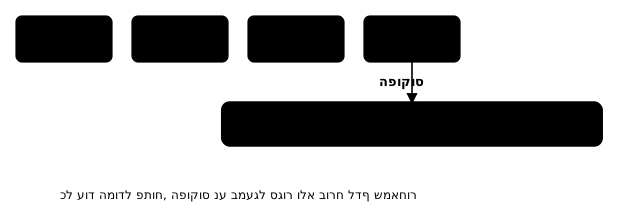
דלג לתוכן - Skip Link
function SkipLink() {
  return (
    <a
      href="#main-content"
      className="skip-link"
    >
      דלג לתוכן הראשי
    </a>
  );
}

// Inside the Layout
function Layout({ children }: { children: React.ReactNode }) {
  return (
    <>
      <SkipLink />
      <header>...</header>
      <nav>...</nav>
      <main id="main-content" tabIndex={-1}>
        {children}
      </main>
      <footer>...</footer>
    </>
  );
}
/* Skip link - visible only on focus */
.skip-link {
  position: absolute;
  top: -40px;
  left: 0;
  background: #000;
  color: #fff;
  padding: 8px 16px;
  z-index: 100;
  transition: top 0.2s;
}

.skip-link:focus {
  top: 0;
}
מודל נגיש
import { useEffect, useRef, type ReactNode } from 'react';

interface ModalProps {
  isOpen: boolean;
  onClose: () => void;
  title: string;
  children: ReactNode;
}

function AccessibleModal({ isOpen, onClose, title, children }: ModalProps) {
  const previousFocusRef = useRef<HTMLElement | null>(null);
  const modalRef = useRef<HTMLDivElement>(null);

  useEffect(() => {
    if (isOpen) {
      // Saving the element that was focused before opening the modal
      previousFocusRef.current = document.activeElement as HTMLElement;

      // Preventing background scrolling
      document.body.style.overflow = 'hidden';
    }

    return () => {
      document.body.style.overflow = '';
      // Returning focus to the previous element
      previousFocusRef.current?.focus();
    };
  }, [isOpen]);

  useEffect(() => {
    if (!isOpen) return;

    function handleEscape(e: KeyboardEvent) {
      if (e.key === 'Escape') onClose();
    }

    document.addEventListener('keydown', handleEscape);
    return () => document.removeEventListener('keydown', handleEscape);
  }, [isOpen, onClose]);

  if (!isOpen) return null;

  return (
    <>
      {/* background layer */}
      <div
        className="modal-overlay"
        onClick={onClose}
        aria-hidden="true"
      />

      {/* the modal */}
      <FocusTrap active={isOpen}>
        <div
          ref={modalRef}
          role="dialog"
          aria-modal="true"
          aria-labelledby="modal-title"
        >
          <h2 id="modal-title">{title}</h2>
          {children}
          <button onClick={onClose} aria-label="סגור">
            X
          </button>
        </div>
      </FocusTrap>
    </>
  );
}
סיכום
בשיעור זה למדנו על:
- WCAG - שלוש רמות הנגישות (A, AA, AAA) וארבעת העקרונות (POUR)
- ARIA - תפקידים, states וproperties שמוסיפים מידע נגישות
- ניהול פוקוס - סדר טאב, העברת פוקוס, וניווט מקלדת
- קוראי מסך - טקסט חלופי, אזורים חיים, והסתרה נבונה
- טפסים נגישים - תוויות, שגיאות, וקיבוץ שדות
- ניגודיות צבעים - יחסי ניגודיות, תנועה מופחתת
- בדיקת נגישות - כלים אוטומטיים (axe, Lighthouse) ובדיקות ידניות
- קומפוננטות נגישות - מלכודת פוקוס, Skip Link, מודל נגיש
נגישות היא לא תוספת - היא חלק מפיתוח איכותי שמשרת את כל המשתמשים.