2.6 - מערכים - מתודות מתקדמות - הרצאה
מתודות מתקדמות של מערכים - Advanced Array Methods
בשיעור הקודם למדנו את הבסיס של מערכים - איך ליצור אותם, לגשת לאלמנטים, ולהשתמש במתודות בסיסיות כמו push ו-pop.
עכשיו נכיר את המתודות המתקדמות - אלה שהופכות את JavaScript לשפה באמת חזקה לעבודה עם נתונים.
המתודות האלה חשובות במיוחד כי הן הבסיס לעבודה עם React בהמשך הקורס.
forEach - מעבר על מערך
המתודה forEach מריצה פונקציה על כל אלמנט במערך. היא דומה ללולאת for רגילה, אבל בצורה יותר נקייה.
const names = ["Alice", "Bob", "Charlie"];

// using forEach
names.forEach(function(name) {
  console.log("Hello " + name);
});

// same thing with arrow function
names.forEach((name) => {
  console.log("Hello " + name);
});

// the callback gets 3 arguments: element, index, array
names.forEach((name, index) => {
  console.log(index + ": " + name);
});
// 0: Alice
// 1: Bob
// 2: Charlie
בפייתון הייתם כותבים:
// Python equivalent:
// for name in names:
//     print(f"Hello {name}")

// Python with index:
// for i, name in enumerate(names):
//     print(f"{i}: {name}")
שימו לב - forEach לא מחזירה כלום (מחזירה undefined). היא רק מריצה קוד על כל אלמנט.
map - טרנספורמציה של מערך
map היא אחת המתודות הכי חשובות ב-JavaScript. היא מריצה פונקציה על כל אלמנט ומחזירה מערך חדש עם התוצאות.
const numbers = [1, 2, 3, 4, 5];

const doubled = numbers.map((num) => num * 2);
console.log(doubled); // [2, 4, 6, 8, 10]

// the original array is NOT changed
console.log(numbers); // [1, 2, 3, 4, 5]
דוגמה נוספת - המרת מערך של אובייקטים:
const users = [
  { name: "Alice", age: 25 },
  { name: "Bob", age: 30 },
  { name: "Charlie", age: 35 }
];

const names = users.map((user) => user.name);
console.log(names); // ["Alice", "Bob", "Charlie"]

const descriptions = users.map((user) => `${user.name} is ${user.age} years old`);
console.log(descriptions);
// ["Alice is 25 years old", "Bob is 30 years old", "Charlie is 35 years old"]
בפייתון זה מקביל ל-list comprehension:
// Python equivalent:
// doubled = [num * 2 for num in numbers]
// names = [user["name"] for user in users]

// or using map():
// doubled = list(map(lambda num: num * 2, numbers))
למה map כל כך חשובה? כי ב-React נשתמש בה כל הזמן כדי להפוך מערך של נתונים לרשימת אלמנטים בinterface המשתמש.

ההבדל בין forEach ל-map
זה הבדל קריטי שחייבים להבין:
const numbers = [1, 2, 3];

// forEach - returns undefined
const result1 = numbers.forEach((num) => num * 2);
console.log(result1); // undefined

// map - returns a new array
const result2 = numbers.map((num) => num * 2);
console.log(result2); // [2, 4, 6]
forEach- משמשת כשרוצים לבצע פעולה (side effect) כמו הדפסה, שמירה ל-DB וכו'. לא מחזירה כלום.map- משמשת כשרוצים לטרנספורם מערך למערך חדש. תמיד מחזירה מערך חדש.
כלל אצבע: אם אתם צריכים את התוצאה - השתמשו ב-map. אם לא - השתמשו ב-forEach.
filter - סינון מערך
filter מחזירה מערך חדש שמכיל רק את האלמנטים שעברו את התנאי.
const numbers = [1, 2, 3, 4, 5, 6, 7, 8, 9, 10];

const evens = numbers.filter((num) => num % 2 === 0);
console.log(evens); // [2, 4, 6, 8, 10]

const bigNumbers = numbers.filter((num) => num > 5);
console.log(bigNumbers); // [6, 7, 8, 9, 10]
דוגמה עם אובייקטים:
const products = [
  { name: "Laptop", price: 5000, inStock: true },
  { name: "Phone", price: 3000, inStock: false },
  { name: "Tablet", price: 2000, inStock: true },
  { name: "Watch", price: 1000, inStock: true }
];

const available = products.filter((product) => product.inStock);
console.log(available);
// [{ name: "Laptop", ... }, { name: "Tablet", ... }, { name: "Watch", ... }]

const expensive = products.filter((product) => product.price > 2500);
console.log(expensive);
// [{ name: "Laptop", ... }, { name: "Phone", ... }]
בפייתון זה מקביל ל:
// Python equivalent:
// evens = [num for num in numbers if num % 2 == 0]
// available = [p for p in products if p["in_stock"]]

// or using filter():
// evens = list(filter(lambda num: num % 2 == 0, numbers))

reduce - צמצום לערך יחיד
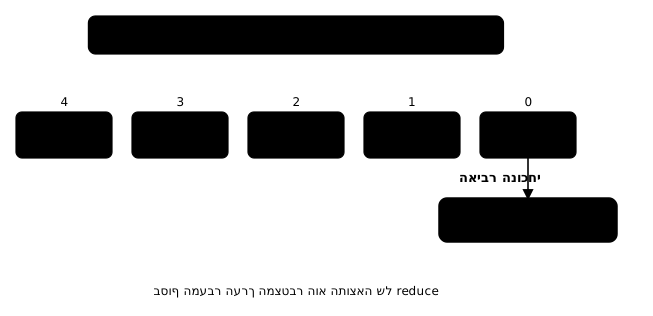
reduce היא המתודה הכי חזקה (וגם הכי מבלבלת בהתחלה). היא מצמצמת את כל המערך לערך יחיד.
const numbers = [1, 2, 3, 4, 5];

// sum all numbers
const sum = numbers.reduce((accumulator, current) => {
  return accumulator + current;
}, 0);
console.log(sum); // 15

// shorter version
const sum2 = numbers.reduce((acc, num) => acc + num, 0);
איך זה עובד:
- הארגומנט השני של reduce (כאן: 0) הוא הערך ההתחלתי של ה-accumulator
- בכל איטרציה, הפונקציה מקבלת את ה-accumulator הנוכחי ואת האלמנט הנוכחי
- מה שמחזירים מהפונקציה הופך ל-accumulator בסיבוב הבא
- בסוף, ה-accumulator האחרון הוא התוצאה
בואו נעקוב אחרי זה צעד אחרי צעד:
// numbers = [1, 2, 3, 4, 5], initial value = 0

// step 1: acc=0,  current=1 -> return 0+1=1
// step 2: acc=1,  current=2 -> return 1+2=3
// step 3: acc=3,  current=3 -> return 3+3=6
// step 4: acc=6,  current=4 -> return 6+4=10
// step 5: acc=10, current=5 -> return 10+5=15
// result: 15
דוגמאות נוספות:
// find the maximum value
const max = numbers.reduce((acc, num) => num > acc ? num : acc, -Infinity);
console.log(max); // 5

// count occurrences
const fruits = ["apple", "banana", "apple", "cherry", "banana", "apple"];
const count = fruits.reduce((acc, fruit) => {
  acc[fruit] = (acc[fruit] || 0) + 1;
  return acc;
}, {});
console.log(count); // { apple: 3, banana: 2, cherry: 1 }
בפייתון זה מקביל ל:
// Python equivalent:
// from functools import reduce
// total = reduce(lambda acc, num: acc + num, numbers, 0)

// or just: total = sum(numbers)
find ו-findIndex - מציאת אלמנט
find מחזירה את האלמנט הראשון שעומד בתנאי. findIndex מחזירה את האינדקס שלו.
const users = [
  { id: 1, name: "Alice", role: "admin" },
  { id: 2, name: "Bob", role: "user" },
  { id: 3, name: "Charlie", role: "user" },
  { id: 4, name: "Diana", role: "admin" }
];

// find the first admin
const admin = users.find((user) => user.role === "admin");
console.log(admin); // { id: 1, name: "Alice", role: "admin" }

// find user by id
const bob = users.find((user) => user.id === 2);
console.log(bob); // { id: 2, name: "Bob", role: "user" }

// if nothing found - returns undefined
const notFound = users.find((user) => user.id === 999);
console.log(notFound); // undefined

// findIndex - returns the index
const adminIndex = users.findIndex((user) => user.role === "admin");
console.log(adminIndex); // 0

// if nothing found - returns -1
const notFoundIndex = users.findIndex((user) => user.id === 999);
console.log(notFoundIndex); // -1
ההבדל מ-filter: בעוד ש-filter מחזירה את כל האלמנטים שעומדים בתנאי (מערך), find מחזירה רק את הראשון (ערך בודד).
some ו-every - בדיקת תנאים
some בודקת אם לפחות אלמנט אחד עומד בתנאי. every בודקת אם כל האלמנטים עומדים בתנאי.
const numbers = [1, 2, 3, 4, 5];

// some - is there at least one even number?
const hasEven = numbers.some((num) => num % 2 === 0);
console.log(hasEven); // true

// every - are all numbers positive?
const allPositive = numbers.every((num) => num > 0);
console.log(allPositive); // true

// every - are all numbers greater than 3?
const allBiggerThan3 = numbers.every((num) => num > 3);
console.log(allBiggerThan3); // false
דוגמה מעשית - ולידציה של טופס:
const formFields = [
  { name: "email", value: "test@test.com", valid: true },
  { name: "password", value: "1234", valid: false },
  { name: "name", value: "John", valid: true }
];

const isFormValid = formFields.every((field) => field.valid);
console.log(isFormValid); // false - password is not valid

const hasAnyValue = formFields.some((field) => field.value.length > 0);
console.log(hasAnyValue); // true
בפייתון זה מקביל ל:
// Python equivalent:
// has_even = any(num % 2 == 0 for num in numbers)  -> some
// all_positive = all(num > 0 for num in numbers)    -> every
sort - מיון מערך
sort ממיינת את המערך. אבל יש בה מלכודת שחשוב להכיר.
מיון מחרוזות - עובד כצפוי
const fruits = ["banana", "apple", "cherry"];
fruits.sort();
console.log(fruits); // ["apple", "banana", "cherry"]
מיון מספרים - מלכודת!
const numbers = [10, 5, 40, 25, 1000, 1];
numbers.sort();
console.log(numbers); // [1, 10, 1000, 25, 40, 5] - wrong!
למה? כי sort בברירת מחדל ממיינת לפי סדר לקסיקוגרפי (כמו מילון) - היא ממירה הכל למחרוזות ומשווה תו-תו. "10" בא לפני "5" כי "1" בא לפני "5".
הפתרון - פונקציית השוואה - comparator
const numbers = [10, 5, 40, 25, 1000, 1];

// ascending order
numbers.sort((a, b) => a - b);
console.log(numbers); // [1, 5, 10, 25, 40, 1000]

// descending order
numbers.sort((a, b) => b - a);
console.log(numbers); // [1000, 40, 25, 10, 5, 1]
איך זה עובד?
- אם הפונקציה מחזירה מספר שלילי - a בא לפני b
- אם מחזירה מספר חיובי - b בא לפני a
- אם מחזירה 0 - הסדר לא משנה
מיון אובייקטים
const users = [
  { name: "Charlie", age: 30 },
  { name: "Alice", age: 25 },
  { name: "Bob", age: 35 }
];

// sort by age
users.sort((a, b) => a.age - b.age);
// [Alice(25), Charlie(30), Bob(35)]

// sort by name
users.sort((a, b) => a.name.localeCompare(b.name));
// [Alice, Bob, Charlie]
שימו לב ש-sort משנה את המערך המקורי (mutating). אם רוצים לשמור על המקור:
const sorted = [...numbers].sort((a, b) => a - b);
// or
const sorted2 = numbers.toSorted((a, b) => a - b); // modern - does not mutate
שרשור מתודות - Method Chaining
אחד הדברים הכי חזקים במתודות מערכים - אפשר לשרשר אותן. כל מתודה שמחזירה מערך מאפשרת לקרוא מתודה נוספת ישירות על התוצאה.
const users = [
  { name: "Alice", age: 17, score: 85 },
  { name: "Bob", age: 22, score: 92 },
  { name: "Charlie", age: 19, score: 78 },
  { name: "Diana", age: 25, score: 95 },
  { name: "Eve", age: 16, score: 88 }
];

// get names of adult users (18+), sorted by score (highest first)
const result = users
  .filter((user) => user.age >= 18)
  .sort((a, b) => b.score - a.score)
  .map((user) => user.name);

console.log(result); // ["Diana", "Bob", "Charlie"]
שרשור מתודות הופך קוד ארוך ומסובך לקוד קריא ואלגנטי. כל שורה עושה צעד אחד בעיבוד הנתונים.
flat ו-flatMap
flat משטחת מערך מקונן:
const nested = [1, [2, 3], [4, [5, 6]]];

const flat1 = nested.flat();
console.log(flat1); // [1, 2, 3, 4, [5, 6]] - one level

const flat2 = nested.flat(2);
console.log(flat2); // [1, 2, 3, 4, 5, 6] - two levels

const flatAll = nested.flat(Infinity);
console.log(flatAll); // [1, 2, 3, 4, 5, 6] - all levels
flatMap משלבת map ואחריה flat ברמה אחת:
const sentences = ["Hello World", "How are you"];

const words = sentences.flatMap((sentence) => sentence.split(" "));
console.log(words); // ["Hello", "World", "How", "are", "you"]

// without flatMap you'd get:
const wordsNested = sentences.map((sentence) => sentence.split(" "));
console.log(wordsNested); // [["Hello", "World"], ["How", "are", "you"]]
אי-שינוי - Immutability
עיקרון חשוב מאוד, במיוחד בהקשר של React: לא לשנות את המערך המקורי.
חלק מהמתודות משנות את המערך (mutating):
- sort(), reverse(), splice(), push(), pop(), shift(), unshift()
חלק לא משנות ומחזירות מערך חדש (non-mutating):
- map(), filter(), reduce(), concat(), slice(), flat(), flatMap()
גרסאות מודרניות שלא משנות:
- toSorted() - במקום sort()
- toReversed() - במקום reverse()
- toSpliced() - במקום splice()
- with(index, value) - במקום arr[index] = value
const original = [3, 1, 2];

// bad - mutates original
original.sort();
console.log(original); // [1, 2, 3] - original is changed!

// good - creates a new array
const original2 = [3, 1, 2];
const sorted = original2.toSorted();
console.log(sorted);    // [1, 2, 3]
console.log(original2); // [3, 1, 2] - original is untouched
למה זה חשוב? כי ב-React, כשמשנים state, צריך ליצור מערך חדש - אחרת React לא יודעת שמשהו השתנה ולא מרנדרת מחדש.
Object.groupBy - קיבוץ לפי קריטריון
פיצ'ר חדש יחסית שמאפשר לקבץ אלמנטים לפי קריטריון מסוים:
const people = [
  { name: "Alice", city: "Tel Aviv" },
  { name: "Bob", city: "Jerusalem" },
  { name: "Charlie", city: "Tel Aviv" },
  { name: "Diana", city: "Haifa" },
  { name: "Eve", city: "Jerusalem" }
];

const byCity = Object.groupBy(people, (person) => person.city);
console.log(byCity);
// {
//   "Tel Aviv": [{ name: "Alice", ... }, { name: "Charlie", ... }],
//   "Jerusalem": [{ name: "Bob", ... }, { name: "Eve", ... }],
//   "Haifa": [{ name: "Diana", ... }]
// }
לפני Object.groupBy, היינו צריכים לעשות את זה עם reduce:
// the old way with reduce
const byCity2 = people.reduce((groups, person) => {
  const city = person.city;
  if (!groups[city]) {
    groups[city] = [];
  }
  groups[city].push(person);
  return groups;
}, {});
בפייתון זה מקביל ל:
// Python equivalent:
// from itertools import groupby
// or using defaultdict:
// from collections import defaultdict
// by_city = defaultdict(list)
// for person in people:
//     by_city[person["city"]].append(person)
דפוסים מעשיים - Practical Patterns
ספירה - Counting
const votes = ["yes", "no", "yes", "yes", "no", "abstain", "yes"];

const tally = votes.reduce((counts, vote) => {
  counts[vote] = (counts[vote] || 0) + 1;
  return counts;
}, {});

console.log(tally); // { yes: 4, no: 2, abstain: 1 }
שטוח וייחודי - Flatten and Unique
const tags = [
  ["js", "react"],
  ["js", "node"],
  ["python", "react"]
];

const uniqueTags = [...new Set(tags.flat())];
console.log(uniqueTags); // ["js", "react", "node", "python"]
סיכום עם תנאי
const orders = [
  { product: "Laptop", price: 5000, status: "completed" },
  { product: "Phone", price: 3000, status: "pending" },
  { product: "Tablet", price: 2000, status: "completed" },
  { product: "Watch", price: 1000, status: "cancelled" }
];

const completedTotal = orders
  .filter((order) => order.status === "completed")
  .reduce((total, order) => total + order.price, 0);

console.log(completedTotal); // 7000
טרנספורמציה של נתונים
const rawData = [
  { firstName: "alice", lastName: "smith", score: 85 },
  { firstName: "bob", lastName: "jones", score: 92 },
  { firstName: "charlie", lastName: "brown", score: 78 }
];

const processed = rawData
  .map((person) => ({
    fullName: person.firstName[0].toUpperCase() + person.firstName.slice(1) + " " +
              person.lastName[0].toUpperCase() + person.lastName.slice(1),
    grade: person.score >= 90 ? "A" : person.score >= 80 ? "B" : "C"
  }))
  .sort((a, b) => a.fullName.localeCompare(b.fullName));

console.log(processed);
// [
//   { fullName: "Alice Smith", grade: "B" },
//   { fullName: "Bob Jones", grade: "A" },
//   { fullName: "Charlie Brown", grade: "C" }
// ]
סיכום
forEach- מעבר על מערך (לא מחזירה כלום)map- טרנספורמציה, מחזירה מערך חדש (חשוב מאוד ל-React)filter- סינון, מחזירה מערך חדשreduce- צמצום לערך יחידfind/findIndex- מציאת אלמנט ראשון שעומד בתנאיsome/every- בדיקת תנאים (כמו any/all בפייתון)sort- מיון (עם comparator למספרים)flat/flatMap- שטיחת מערכים מקוננים- שרשור מתודות - הכוח האמיתי של המתודות האלה
- אי-שינוי - תמיד העדיפו ליצור מערך חדש במקום לשנות את המקורי